Run reports
A benchmark is easier to explain when its configuration and results stay together. Stroppy 6.2 saves a report for each run, then lets you inspect it in the terminal or a local browser. You do not need a cloud account, a collector, or a JavaScript runtime to keep and read the results.
This guide follows one workflow: run a workload, find its report, inspect a recording, compare two runs, and export the evidence. For metric definitions and benchmark methodology, see Reports & Workflow.
Record a run
Use a disposable database: the default setup steps recreate workload tables. This short TPC-B example loads data and records five seconds of measured work:
stroppy run tpcb/tx -d pg \
  -D url='postgres://postgres:postgres@localhost:5432/bench?sslmode=disable' \
  --scale-factor 1 --executor constant-vus --vus 4 --duration 5s \
  --capture-metrics --capture-logs --log-level info --log-mode production
The terminal summary stays on stderr. The final report is saved automatically in
~/.stroppy/reports/; capture streams live beside it. Capture flags are optional
and independent. A normal report still contains final metrics without a timeline
or logs.
Request explicit output when needed:
stroppy run tpcb/tx -d pg --iterations 100 \
  --report-file run.json --report-html run.html

# One JSON document on stdout, without mixing diagnostics into it.
stroppy run tpcb/tx -d pg --iterations 100 --report-format json > run.json
--no-save-report disables automatic history, not requested output.
--no-report disables report construction and conflicts with capture or requested
report output. A requested output failure is an error; an automatic history-save
failure warns without changing the workload's outcome.
Find the saved report
stroppy reports list
stroppy reports list --workload tpcb/tx --driver pg --status completed
stroppy reports list --since 2026-10-01 --until 2026-11-01 --limit 0 -o json
stroppy reports status -o json
Dates are UTC; since is inclusive and until is exclusive. Repeated values
match any value within one filter, while different filters combine. Lists are
newest first; --reverse selects oldest first. The default list limit is 20;
--limit 0 returns all matches.
A history ID looks like 2026-10-20T12-00-00Z-tpcb-tx. Use the actual ID from
reports list, not that example or the report UUID stored inside JSON:
ID=$(stroppy reports list --workload tpcb/tx --limit 1 -o json | jq -r '.[0].id')
stroppy reports get "$ID" > saved-run.json
The filename-derived history ID addresses a saved copy. The report UUID and optional run ID identify the invocation/configuration and are not substitutes for it. Repeated saves or equal start timestamps can have distinct history IDs.
Open the local catalog
stroppy reports serve --listen 127.0.0.1:8080
Open http://127.0.0.1:8080 in a browser. With no --listen,
Stroppy chooses an available loopback port and prints its URL. Stop the server
with Ctrl-C.
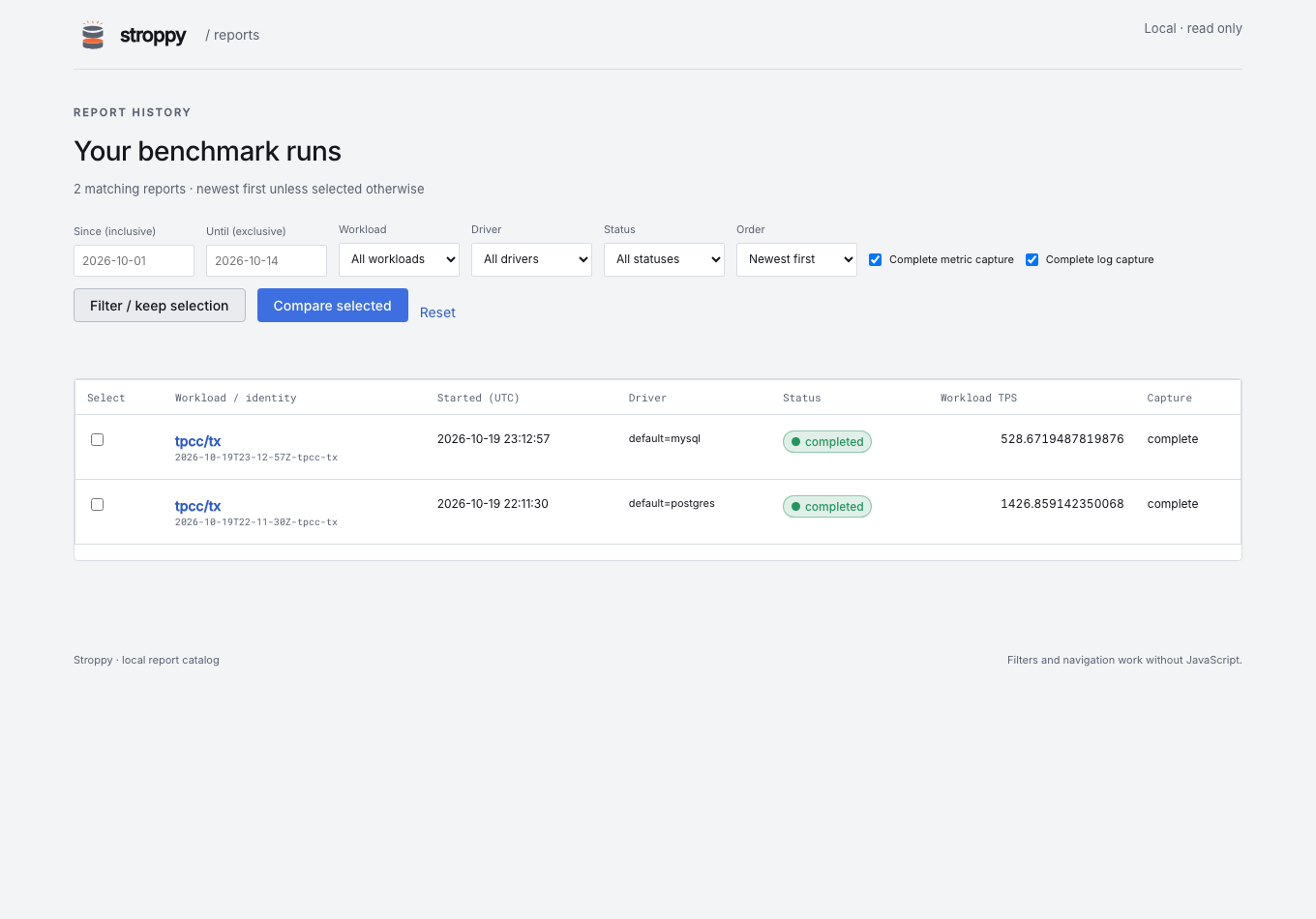
The catalog lists saved workload names and every named driver's type, including custom workloads. Workload, driver, status, start-time, and order filters work without JavaScript. Complete metric capture and Complete log capture are independent filters: unfinished, missing, dropped, truncated, or unreadable selected streams do not match. Filtering happens before pagination, and selected reports remain available for comparison across pages.
The server is read-only: it cannot start a workload or delete reports. It has no authentication or multi-user hosting contract. Keep loopback binding unless you intend to expose authored report data in a trusted environment.
Read a report
A report starts with the run's status and native workload measurements. Expand Identity & configuration for timestamps, IDs, workload/build versions, parameters and their sources, drivers, host details, metadata, and execution policies. This makes the default view compact without hiding the information needed to reproduce a run.
Metrics are grouped by type. Expand one metric for its dimensions, exact values, and charts. Workload-owned results and unfamiliar fields use generic tables and expandable objects rather than disappearing because the viewer does not know the workload.
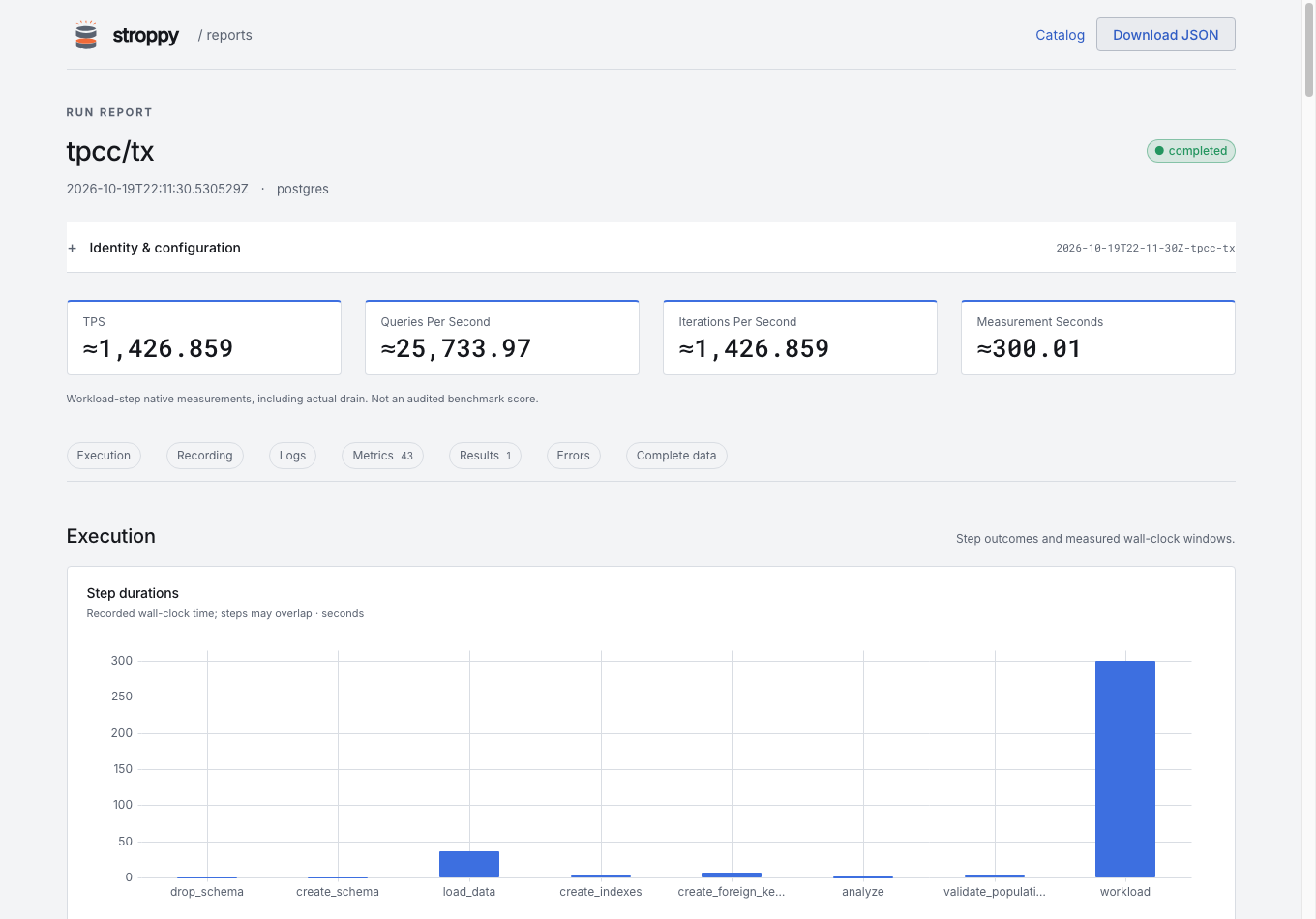
Read status and errors before comparing speed. Nonfatal terminal iteration/query
errors can leave exit status zero while the report says completed_with_errors.
A successful retry is counted separately and does not itself make the run fail.
What a chart means
tpsis successful logical transactions per second over the measured executor window, including actual drain. It is not TPC-C tpmC or an audited benchmark score.iterations_per_secondincludes failed completed iterations;queries_per_secondcounts successful SDK queries.- Native rate gauges are cumulative averages, not fresh per-interval rates.
- Histogram percentiles are bucket estimates unless explicitly recorded otherwise.
≈marks approximate previews/calculations. Buckets are counts, not raw samples. - Different
step, phase, outcome, unit, scope, or attribute sets are separate measurements. Missing values stay missing rather than becoming zero.
Exact source values remain in expanded data and the original JSON download.
Follow metrics and logs through time
stroppy run tpcb/tx -d pg \
  --executor constant-vus --vus 4 --duration 30s \
  --capture-metrics --capture-logs --capture-interval 1s \
  --capture-max-bytes 67108864 --log-level info
Recording is local and independent of OTLP export. --capture-interval defaults
to 1s. The byte budget defaults to 64 MiB per metric/log stream. Short runs
may have only a few samples; longer runs need a budget appropriate to their
metric cardinality and log volume.
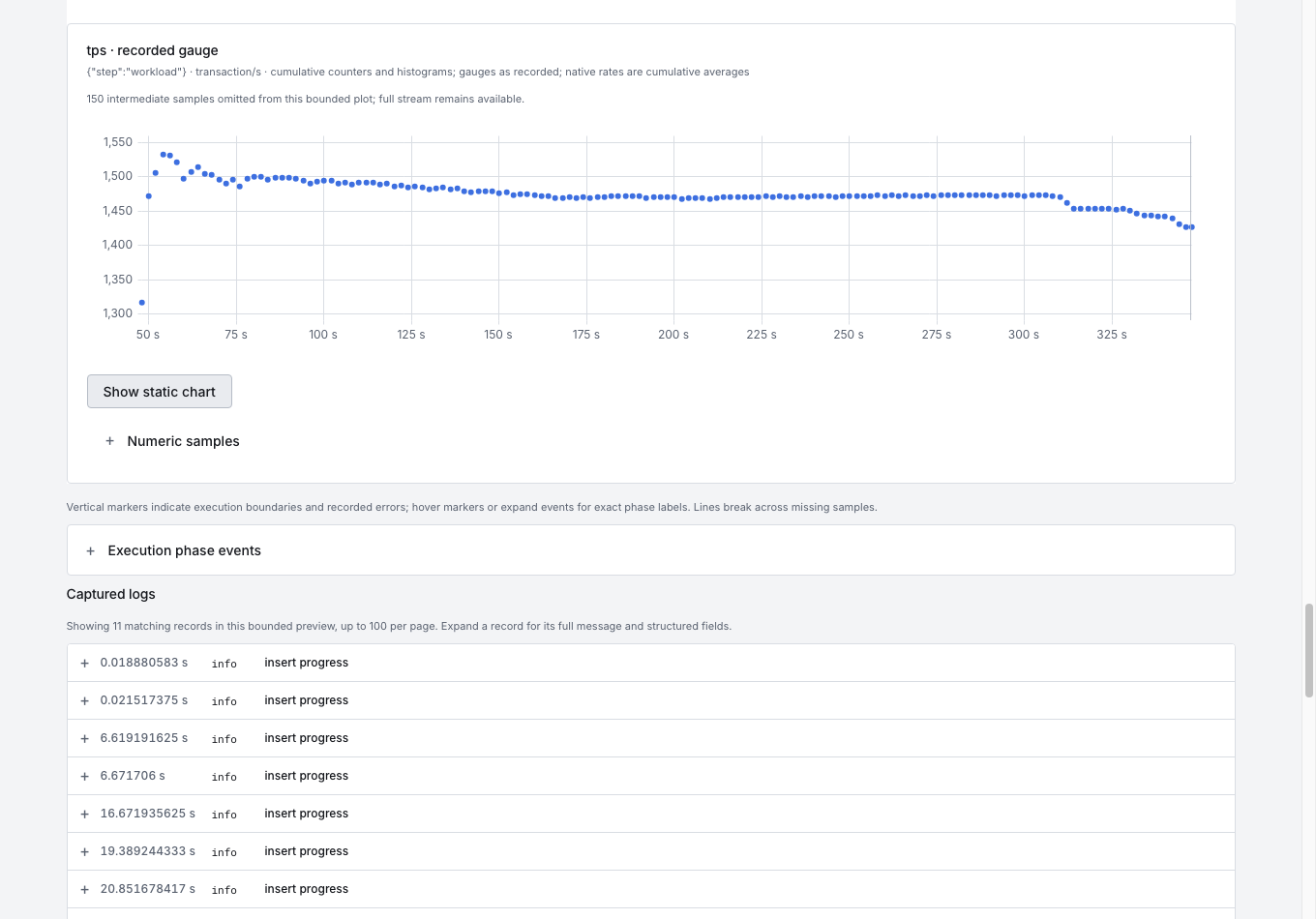
Timelines use elapsed time since run start, including setup and load—not since measured traffic starts. Phase markers explain setup, warmup, measurement, and drain where recorded. Lines break across gaps; a bounded plot can omit intermediate samples and says so. No smoothing or resampling reconstructs unrecorded values.
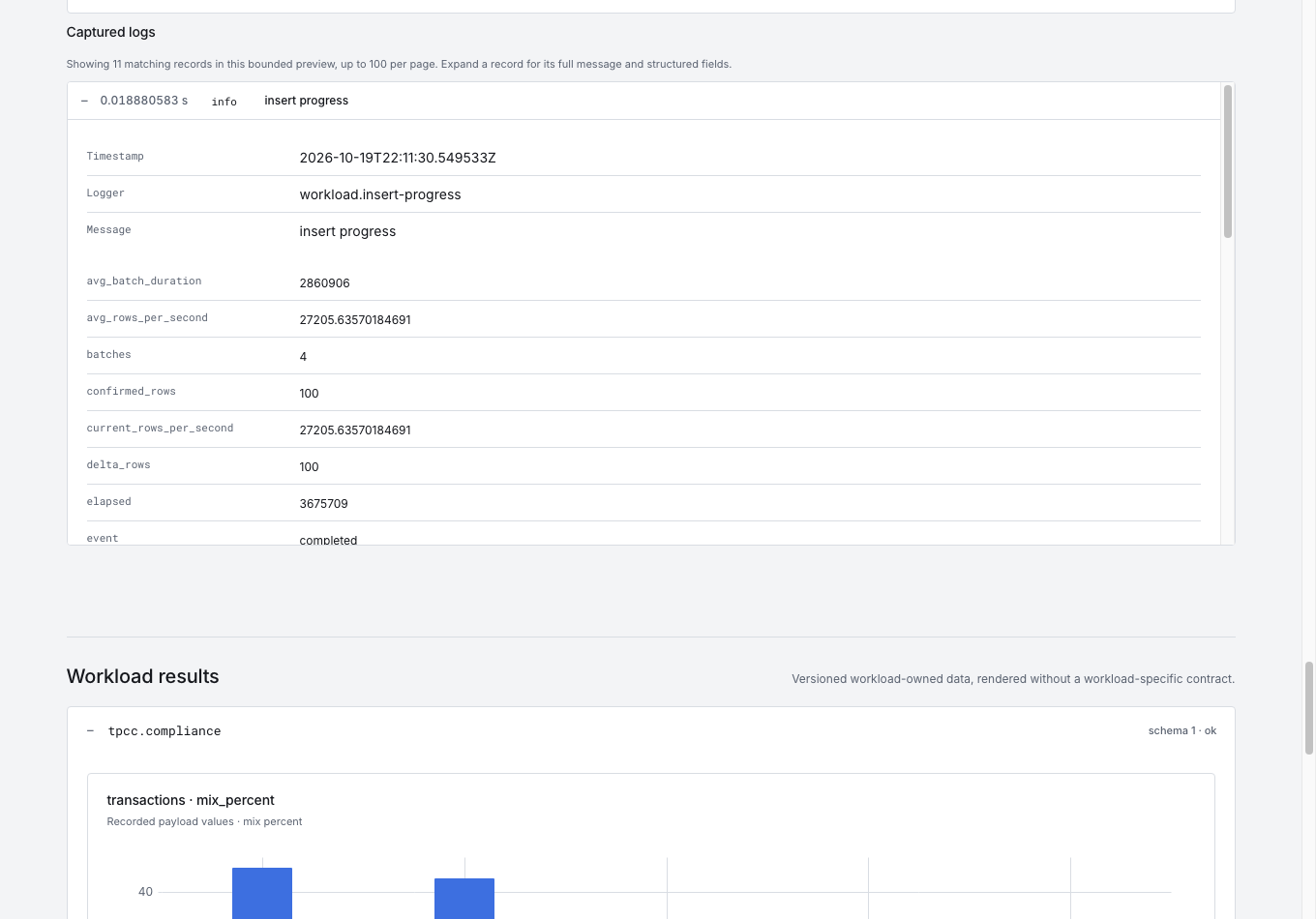
Log filters select level, step, elapsed range, and text. Expand a record for the full message, timestamp, logger, and structured fields. Capture uses the effective log level; it does not turn debug logging on. It captures the run-owned logger, not arbitrary process stdout/stderr, database-server logs, or host telemetry. A quiet successful run can legitimately have few logs.
The manifest records stream accounting: records, bytes, dropped/truncated data, missed samples, and write errors. An interrupted or lossy capture is visibly incomplete. Capture loss does not turn a successful database operation into a failed transaction, and a complete final report does not prove its recording is complete.
The browser/HTML preview is bounded: at most 8 MiB and 2,000 metric/event records are inspected, and up to 100 filtered logs appear per page within the bounded scan. A preview is not the whole recording. Retrieve complete streams when the question needs all samples:
stroppy reports artifact "$ID" metrics.jsonl > metrics.jsonl
stroppy reports artifact "$ID" logs.jsonl > logs.jsonl
stroppy reports artifact "$ID" manifest.json > manifest.json
Compare two runs
Record a second run with the same setup and change one setting you want to investigate. Comparing different databases can illustrate the viewer, but does not establish a fair performance ranking by itself.
stroppy reports list --workload tpcb/tx --limit 2 -o json > selected.json
REFERENCE=$(jq -r '.[1].id' selected.json)
CANDIDATE=$(jq -r '.[0].id' selected.json)

stroppy reports compare "$REFERENCE" "$CANDIDATE"
stroppy reports compare "$REFERENCE" "$CANDIDATE" -o json --file comparison.json
stroppy reports compare "$REFERENCE" "$CANDIDATE" -o html --file comparison.html
Select two to eight reports in the catalog and choose Compare selected for the same comparison in a browser. The first selected report is the reference; choose another reference explicitly when needed.
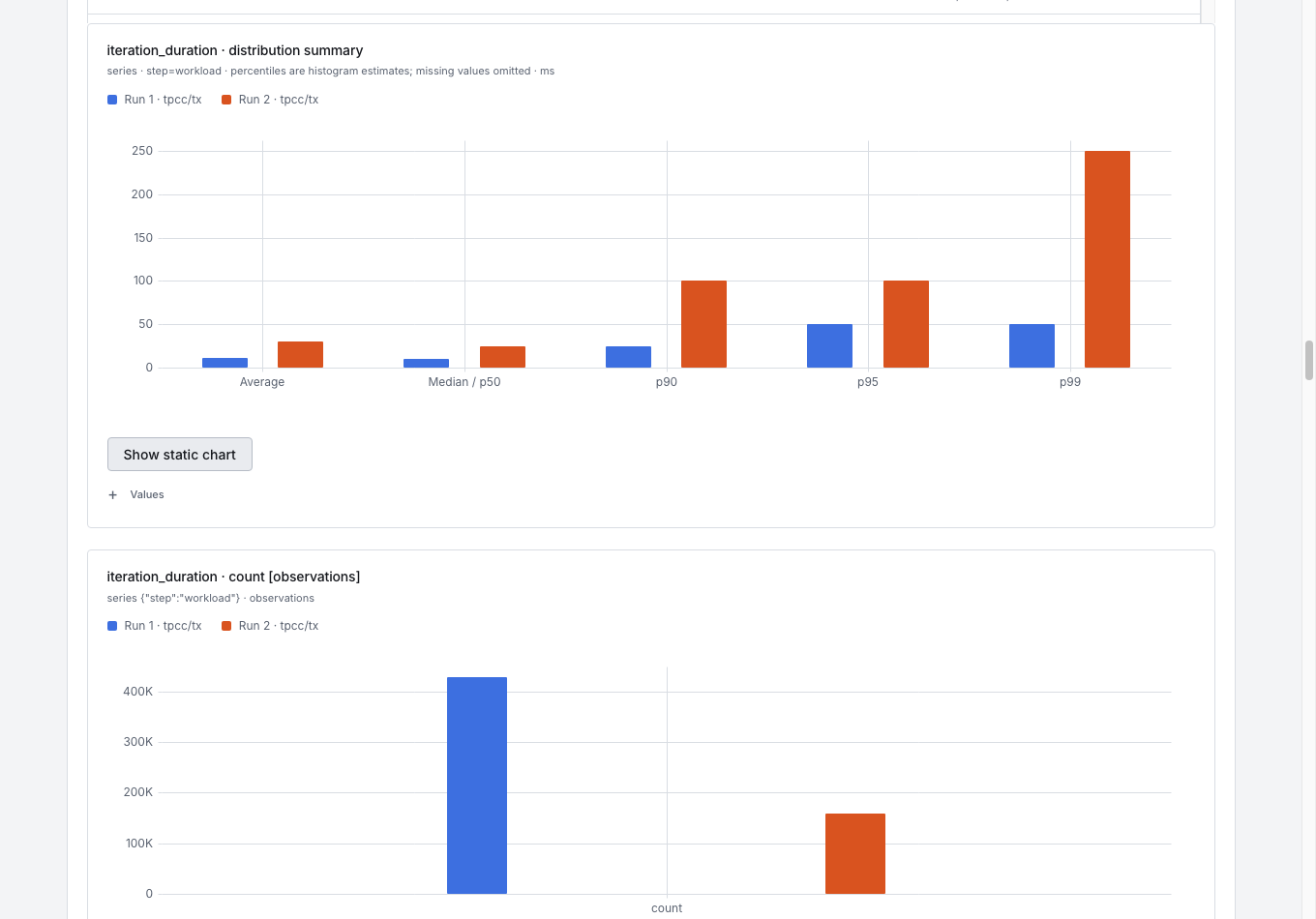
The comparison shows configuration/result differences and matches measurements by name, type, unit, scope, complete attributes, and statistic. Incompatible or missing measurements remain unavailable. Absolute changes use candidate minus reference; percentage changes divide by the absolute reference value. A zero reference has no percentage delta. These are descriptive differences, not significance tests or "better/faster" verdicts.
Histogram summaries place average and p50/p90/p95/p99 estimates on a common axis, with adjacent bars per run. Counts and sums stay on separate charts because they have different meanings/units. Run colors remain stable across charts even when a run has no matching measurement. Exact numeric tables remain available.
Captured timelines align at each run's start. If one load took longer, its measured traffic appears later on the x-axis. Inspect phase markers and final measurement windows before interpreting that shift.
Export and share
stroppy reports export "$ID" --file report.html
stroppy reports bundle "$ID" --file report.zip
HTML includes styles, fonts, static SVGs, original report data, and optional
interactive charts. It works from file: without a CDN. JavaScript enhances the
charts only after successful rendering; static views and numeric tables remain
available if scripts fail, are disabled, or when printing.
A standalone HTML file includes only a bounded recording preview. The ZIP
contains index.html, portable report.json, a capture manifest, and complete
recording streams. Extract it and open index.html to keep relative artifact
links working offline. A report without capture needs no recording sidecars.
When keeping JSON plus captures without normal history, choose persistent output:
stroppy run tpcb/tx -d pg --iterations 100 --capture-metrics \
  --no-save-report --report-file run.json --report-html run.html
Copy the report with its referenced capture directory, or use a bundle. An
explicit --capture-dir PATH is another way to retain recordings independently.
Reports can contain authored SQL, query values, metadata, and log fields. Do not assume every custom field is secret-free. Check content before sharing; file exports use owner-only permissions, which you may deliberately change for a reader or web server.
Keep history manageable
Removal and pruning show their selection first:
stroppy reports remove "$ID"
stroppy reports prune --older-than 720h --workload tpcb/tx
Only after checking the preview, confirm explicitly:
stroppy reports remove "$ID" --yes
stroppy reports prune --older-than 720h --workload tpcb/tx --yes
Owned recording copies are removed with their report. Removing one saved copy
does not remove another copy's capture. Back up the history JSON and relative
captures/ subtree together if you do not use bundles.
The screenshots show actual local TPC-C SF100 PostgreSQL/MySQL runs collected for five minutes with 16 VUs, one-second capture, and no warmup. They illustrate the report UI, not a controlled database comparison or a benchmark recommendation. The shorter TPC-B commands above demonstrate the workflow without requiring that dataset size or run duration.