Stroppy 6.2: keeping the run, not just the number
Stroppy 6.2 is out. This release is mostly about the work around a benchmark: keeping its results, understanding what happened, comparing it with another run, and writing a workload when the built-ins do not quite fit.
The Go engine arrived in 6.0. Since then we have been using it, finding rough edges, and filling in the parts that make an experiment repeatable. There are also new database presets, a banking workload, and a few ways to control TPC-C traffic more carefully. None of that makes a benchmark fair on its own, but it makes fewer details depend on what we remember after the terminal closes.
Saved reports, metrics, and logs
Suppose we want to see how one workload behaves with four connections, then with eight. We could copy two TPS numbers into a note. The problem comes later: did both runs finish cleanly? Did one include warmup? Was the pool size the same? Which database settings did we actually use?
Stroppy now saves a report by default. It keeps the effective inputs, execution windows, final measurements, and errors together. We can ask for a recording as well:
stroppy run tpcb/tx -d pg \
  -D url='postgres://postgres:postgres@localhost:5432/bench?sslmode=disable' \
  --executor constant-vus --vus 4 --duration 30s \
  --capture-metrics --capture-logs --log-level info

stroppy reports list
stroppy reports serve --listen 127.0.0.1:8080
The default setup recreates the workload's tables, so this belongs on a database
we can throw away. For a second traffic run against the same loaded data, we can
select only the workload step and change the VU count.
The local catalog shows what is saved. We can filter by workload or driver, require complete metric or log capture, select two reports, and compare them. The browser is a read-only viewer, not another way to start workloads.
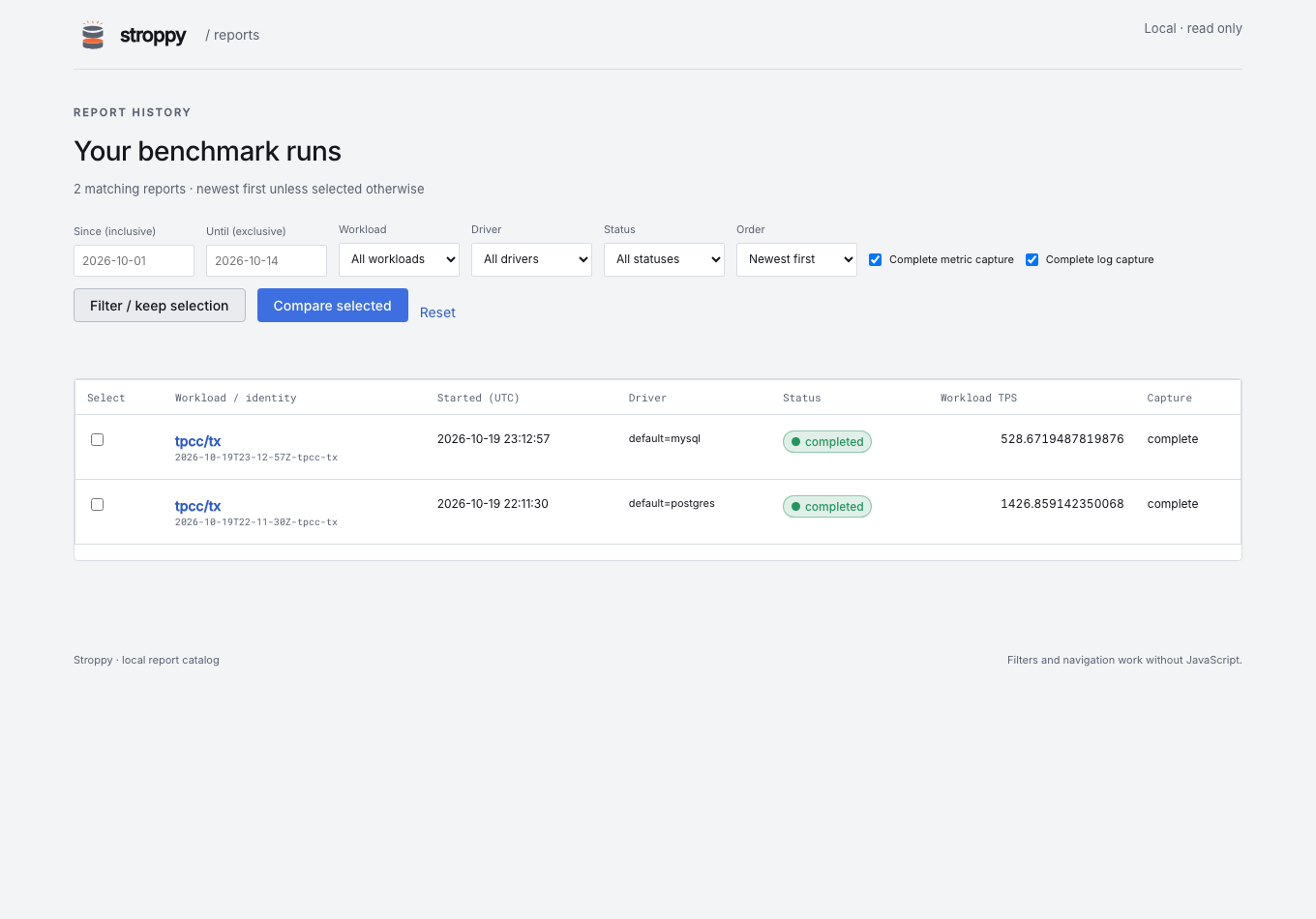
There are a few deliberate limits here. Final metrics do not become a timeline unless we recorded samples. Metric capture and log capture are separate switches. A missing value is not zero. Logs respect the chosen log level; recording does not quietly turn on debug output. If the recording drops data or stops early, that is visible too.
Run comparison and offline exports
The comparison puts configuration differences beside the numbers. For histograms, average and p50/p90/p95/p99 estimates share a chart, with adjacent bars for each run. Counts and sums stay separate. A run keeps the same color across charts.
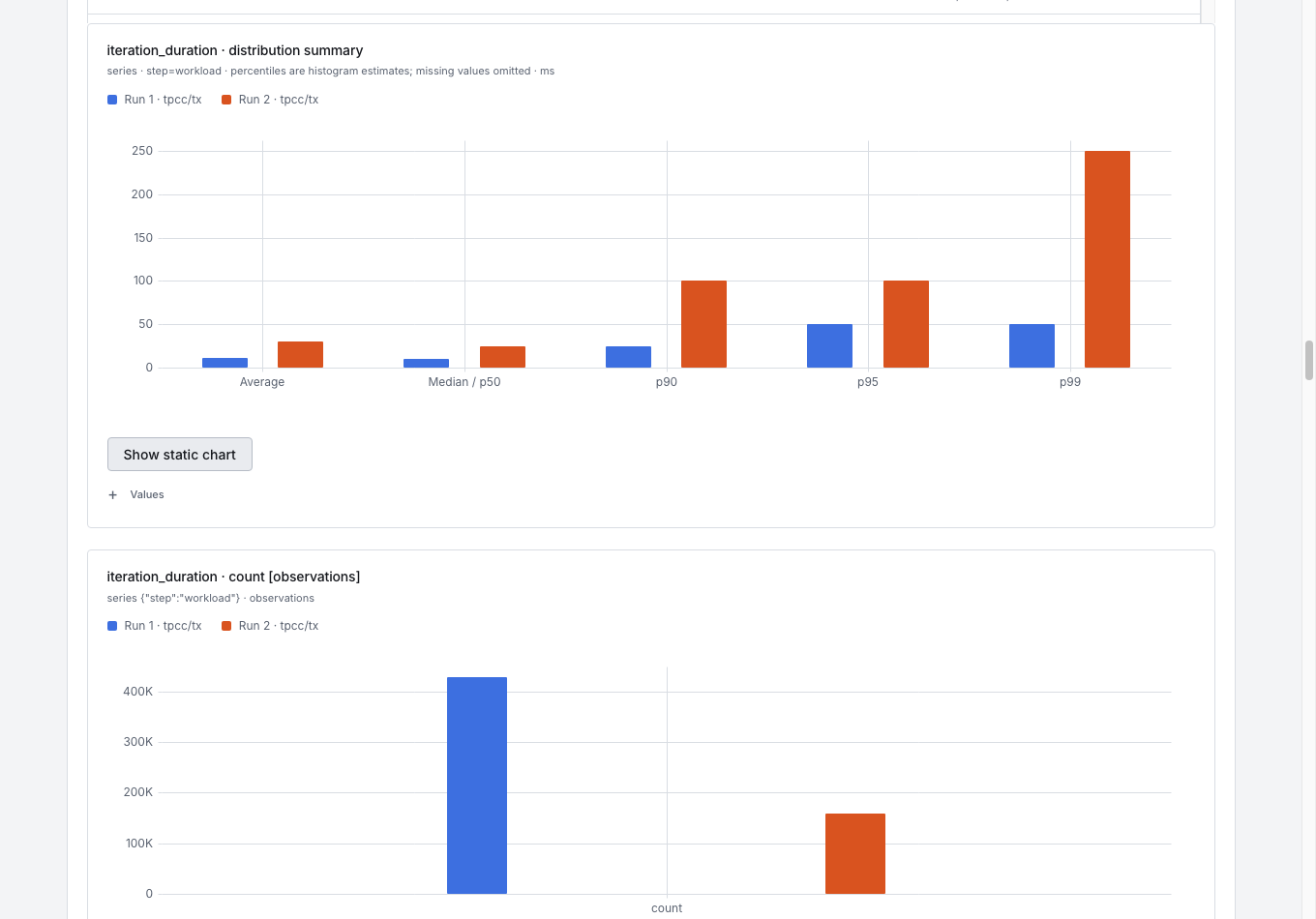
The screenshots here come from actual five-minute TPC-C runs against local PostgreSQL and MySQL containers. They show the interface, not a database ranking: those runs had different setup times and were not a controlled server-tuning study. That distinction matters more than how neat the chart looks.
Captured timelines start at each run's beginning, including load time. If one load took longer, its measured traffic appears later. Native TPS is also a cumulative average over the measured executor window, not the rate during the last sampling interval. The viewer keeps those meanings; it does not manufacture more precise data from the samples.
The same comparison is available in the terminal:
stroppy reports compare REFERENCE_ID CANDIDATE_ID
stroppy reports compare REFERENCE_ID CANDIDATE_ID \
  -o html --file comparison.html
An HTML export works offline. JavaScript adds interactive charts when available,
but static SVGs, exact values, and expandable data are still there without it.
For sharing the whole recording rather than a bounded preview, use
stroppy reports bundle ID --file run.zip.
The reports guide walks through the complete workflow, including capture budgets and history cleanup.
Custom workloads and the Stroppy SDK
Custom workloads are back. Earlier versions supported them through k6; we left that feature out of the initial native release to keep the engine migration manageable. In 6.2 they return as ordinary Go projects using the Stroppy SDK.
Sometimes a standard workload is the right starting point. Sometimes the question is a single query, an application transaction, or two databases that should return the same answer. The Go authoring API and project tools support that workflow:
stroppy init my-workload
cd my-workload
go test ./...
go run . -d noop --iterations 10
stroppy build .
stroppy list
The generated workload starts with noop, so the skeleton runs before we connect it to a database. It has a definition, typed parameters, explicit steps, and tests. We edit ordinary Go, use the SDK for queries and transactions, and can record operations in tests without needing a server.
A workload can run as its own program or by name through the installed Stroppy
catalog. stroppy eject restores published source. stroppy export builds a
portable binary with the selected custom workloads. The build cache records which
SDK and source went into the result, rather than making the installed runtime a
mystery.
One SDK. Built-in workloads use the same Stroppy SDK as custom workloads, with no special or exclusive workload API. The difference is that they ship with Stroppy rather than being added by the user.
There is more detail in Custom workloads. The aim is not to invent another language for benchmarks. It is to make a small Go project sufficient, and keep the testing and distribution steps unsurprising.
TPC-C warmup and warehouse selection
TPC-C now has an explicit warmup period. When reusing loaded data, a run can look like this:
stroppy run tpcc/tx -d pg --scale-factor 100 \
  --executor constant-vus --vus 16 --warmup 1m --duration 5m \
  --steps warmup,workload
Warmup runs the same mix before measurement. It is not counted in the TPC-C
measurement report, while generic metrics keep separate step=warmup and
step=workload labels. It can help prepare an experiment, but a warmup duration
is not proof of steady state.
There is also --spread-warehouses=true. Normally a VU keeps a home warehouse.
Spread mode chooses one for each transaction within the configured warehouse
range. This lets a smaller client concurrency touch a larger dataset. It changes
the terminal model, so we describe it as a stress profile, not a compliant TPC-C
result.
Pacing, cancellation, and repeated-run history IDs also received fixes. These are less visible than a new flag, but they matter when a run is stopped, retried, or repeated against existing data.
New engines, and a different kind of workload
crdb, yugabyte, and tidb are now driver presets. They reuse PostgreSQL or
MySQL transport where appropriate, but keep their own engine identity, SQL asset
selection, and transaction defaults. A shared wire protocol is not a promise
that every SQL feature works everywhere; the workload pages
describe the supported combinations.
Despite the name, banking is not another TPC-B. TPC-B measures a short
transaction that updates an account, a teller, and a branch, then appends history.
banking instead transfers money between two accounts and swaps their unique
tokens. After the run, it checks that no money or tokens were lost or created.
Its PostgreSQL banking/inject variant adds deliberate commit errors or backend
crashes through Macavity: the question is whether those checks still hold after
interruption. They are conservation checks, not proof that every intended
transfer happened exactly once.
The banking guide describes the full transfer and retry loop, with more detail on fault injection.
Upgrading to 6.2
If you have a custom workload or configuration from 6.1, update these parts when moving to 6.2:
- Go imports use
github.com/stroppy-io/stroppy/v6, with Go 1.27 for source builds. - Custom Go workloads use
bench.Testdefinitions and immediate steps instead of the previous lifecycle interface. - Typed flags, process environment, and
run/paramsconfig replace-eand the configenvmap. - Driver maps use names such as
defaultandprimary, not numeric indexes. - Timed runs select
--executor constant-vusexplicitly;DURATIONalone does not choose it.
The migration guide covers those changes. Prebuilt binaries still need no local Go installation for built-in workloads.
Try Stroppy 6.2
Download 6.2.0, run a small experiment on disposable data, and open its report. If the built-in workload is not the question you wanted to ask, try the generated Go project next.
This is a useful step for us, not a finished benchmark laboratory. The client still has limits, servers need their own telemetry, and a chart cannot decide whether two runs were comparable. What we hope 6.2 does is leave more of the experiment available to inspect—and less of it only in someone's memory.